The detailed steps to change Alipay real-name authentication information are as follows:
Method 1: Change directly through Alipay APP
Open Alipay APP:
Make sure you have Alipay APP installed on your phone and log in to your account.
Visit the "My" page:
On the Alipay homepage, tap the "My" button in the lower right corner of the screen to enter the personal center.
Enter the settings menu:
On the personal center page, click the "Settings" icon in the upper right corner to access the settings menu.
View account and security options:
In the settings menu, find and click the "Accounts & Security" option.
Enter the real-name authentication page:
On the "Account and Security" page, select the "Real-name Authentication" option.
Start changing the real-name authentication information:
On the real-name authentication page, you will see the current authentication information. Click "Change Certification" and then fill in your new name, ID number and other real-name information as prompted on the page.
Upload your ID photo and submit for review:
According to the page requirements, upload the front and back photos of the new ID card and confirm submission for review.
Waiting for the review to be completed:
Alipay will review the new information you submit. After passing the review, your real-name authentication information will be updated successfully.
Method 2: Make changes through the "My Customer Service" online service
Open Alipay APP:
Likewise, make sure you are logged into the Alipay APP.
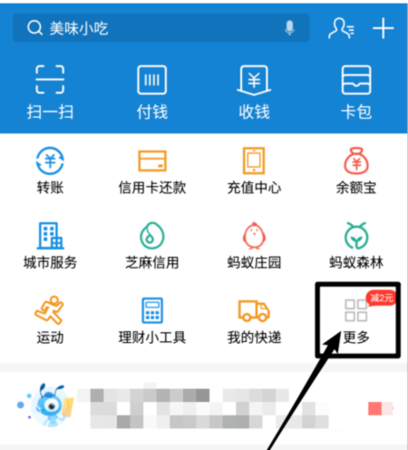
Explore More Features:
On the Alipay homepage, click the "More" button to explore more features.
Find "My Customer Service":
On the "More" function page, find and click "My Customer Service" (usually located in the "Convenient Life" section).
Use online services:
On the "My Customer Service" page, scroll down to the bottom of the page and click "Online Service."
Initiate a request to modify real-name authentication:
In the dialogue window with customer service, enter "Modify real-name authentication" and send.
Select the reason for modification:
The system will provide several options. Please choose the appropriate reason for modification based on your actual situation, such as "I changed my name/changed my ID card", etc.
Follow the prompts:
According to the system prompts, take and upload a new ID card photo and submit it for review after confirming it is correct.
Review pending:
After submitting, wait patiently for Alipay review. After passing the review, your real-name authentication information will be updated.
Things to note:
Before trying to change the real-name authentication, please make sure that your account status is normal and there are no outstanding transactions or disputes.
Please note that once your Alipay account passes real-name authentication and the authentication information is verified through Alipay, you will not be able to change it to someone else's name and ID number.
Changes to real-name authentication information may take some time to be reviewed, so please be patient.
If you encounter any problems during the change process, you can contact Alipay customer service at any time for help.
By following the above steps, you can successfully change Alipay's real-name authentication information.

# Alipay#