Professional virtual currency information station welcome
We have been making efforts.

vc Page 10

Cryptocurrency is a non-legal monetary asset based on digital technology and blockchain, possessing the functions of a medium of exchange and a store of value. Cryptocurrency is a transaction medium that uses cryptographic principles to ensure transaction security and control the creation of transaction units. Cryptocurrency is a type of digital currency (or virtual currency). Bitcoin became the first decentralized cryptocurrency in 2009, after which the term “cryptocurrency” was more commonly used to refer to such designs. Since then, several similar cryptocurrencies have been created, and they are usually referred to as altcoins. Cryptocurrency is based on a decentralized consensus mechanism, in contrast to the banking financial system that relies on a centralized regulatory system.

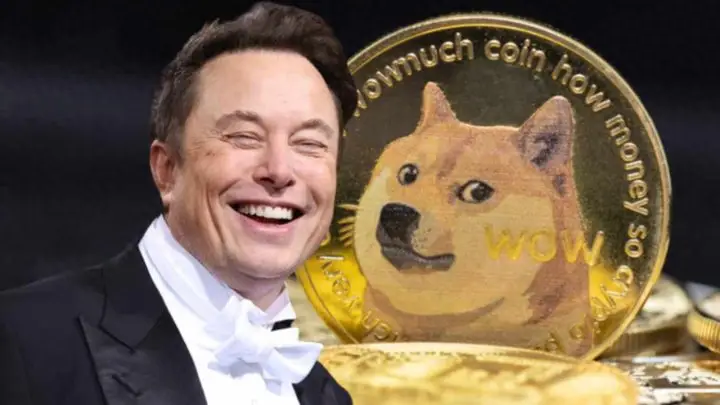
What Is The Purpose Of Musk’s Crazy Hints About Dogecoin, A Seemingly Unreliable Scam?

Jackson Palmer, who was an employee at Adobe at the time, wanted to satirize the proliferation of cryptocurrency at the time, so he added elements of crypto assets to this Doge meme and created a cryptocurrency picture with Doge's avatar. Jackson posted this picture on Twitter and wrote: "Invest in Dogecoin! This will be the next big thing." This post received responses from netizens in both the Meme world and the industry. Under the encouragement of netizens, he bought the domain name dogecoin.com and solicited partners on Twitter who wanted to develop Dogecoin together:

"Investing in Dogecoin, pretty sure it's the next big thing."

This message on Twitter quickly entered the eyes of IBM engineer Billy Markus. He has been studying cryptocurrency and has always hoped to create a cryptocurrency that can be widely used by people instead of simply used for investment.

Billy contacted Jackson. Although Jackson did not respond immediately, Billy began to build Dogecoin. He copied the Bitcoin source code verbatim. Although he could not understand most of it, he made some simple modifications:

1) Change the word Bitcoin to Doge, and change the word mining to dig.

2) Change the currency value from 23 million to 100 billion, and significantly reduce the difficulty of digging holes

3) Change the font to a lively and interesting anime font (comic sans)

It is rumored that the whole process only took about 3 hours. During a lunch break, Billy and Jackson officially launched Dogecoin. It can be said that Jackson created Dogecoin.com, the official portal of Dogecoin, and then Billy developed the first 4 versions of Dogecoin alone.

Two weeks after Dogecoin was born, its daily transaction volume exceeded that of Bitcoin. Less than a month after its birth, the website has received more than 1 million visits! Later, he became popular again in Taiwan with the song "I always recommend breaking up when it comes to relationships".

狗狗币今日最新价格_狗狗币的诞生过程_狗狗币创始人Jackson Palmer

Picture source network

In 2014, Billy and Jackson withdrew from the development of Dogecoin one after another. The reason is unknown. It is speculated that Dogecoin was still worthless at that time, because even the founders themselves said in an interview: "We think this is a big joke that is destined to die." It seems that they don't have any left in their hands.

Later, a new Dogecoin core development team was formed. This team consists of a core maintainer team and has been supported by more than 40 contributors over the years. Dogecoin has been developed and maintained by them since then.

However, compared to the "value investment" investors in the Bitcoin circle, Dogecoin is a bit of a slap in the face, because it was worthless in the first few years, and later it had a market value of tens of billions of dollars. Maybe the existence of some things is valuable in itself, but gold needs time to shine?

The opportunity is that Dogecoin has gradually become the reward currency of the famous American online forum Reddit. Because it is cheap, it is favored by a large number of netizens and celebrities. It can also be regarded as the first practical scenario for benchmarking.

At that time, a Reddit netizen wrote a tipping bot. When a netizen shared great content, he could tip the bot and send 5 Dogecoins to the author to express his gratitude.

At that time, each Dogecoin was worth about US$0.0005. Although the value was not much, more importantly, it was a sense of honor. Some people even said: "Getting a tip of 5 Dogecoins is more satisfying than receiving 2 cents (US$0.02)."

Despite originating as a joke, the low price coupled with ease of purchase makes it easier for those interested in cryptocurrencies to get involved. As a result, Dogecoin’s user base has expanded rapidly, increasing its value as a cryptocurrency. Cryptocurrency infrastructure, mining pools, and trading services were also born at the same time. And Dogecoin quickly developed a large and passionate cryptocurrency community, doing some great causes and charities.

For example, in 2014, the Dogecoin community raised 26.5 million Dogecoins (worth about $30,000 at the time) to support the Jamaican bobsled team to participate in the Sochi Winter Olympics. In March 2014, the Dogecoin community raised more than 40 million Dogecoins (worth approximately $30,000 at the time) to help build clean water wells in Kenya. The Dogecoin Foundation also collaborated with popular YouTubers Mr Beast and Mark Rober on the TeamSeas initiative, which raised $30 million for ocean debris removal.

To this day, Dogecoin’s official website still has relevant introductions.

Dogecoin also has a very unique concept. If Bitcoin is a rebellion against the traditional financial system, then it is a rebellion against Bitcoin. One of its main features that is completely opposite to Bitcoin is: Bitcoin has a fixed total amount and no additional issuance, while DOGE has an initial amount of 100 billion, with unlimited additional issuance at 5% per year. That is, 5 billion Dogecoins are issued every year, and the supply is unlimited. Another attractive feature of Dogecoin is its low entry fee. One Bitcoin is worth tens of thousands of US dollars, even in the bear market, it is beyond the reach of ordinary people. However, the value of one Dogecoin is less than US$1, and the transaction fees are relatively low, which is attractive to investors with limited funds. In addition, as the popularity of Dogecoin increases, more and more trading platforms have announced that they can buy, sell or manage Dogecoin.

You see, Dogecoin was originally used as a reward on the famous American online forum Reddit. Later, Dogecoin developed into a charity. Dogecoin can then be exchanged for other cryptocurrencies on multiple trading platforms for investment purposes. It is worth mentioning that there are already 1,400+ stores around the world that accept customers to pay in Dogecoin, and even Musk announced that he will accept Dogecoin to pay for the SpaceX moon landing mission.

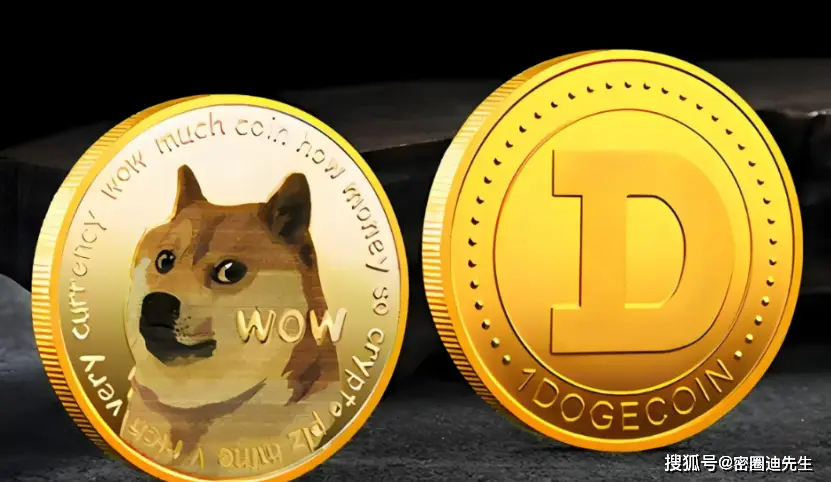
Up to now, Dogecoin has jumped to become the seventh largest cryptocurrency in the world, but who would have thought that the inspiration came from a photo of Kabosu, a Shiba Inu, that appeared online in 2010!

02 Price jumps repeatedly

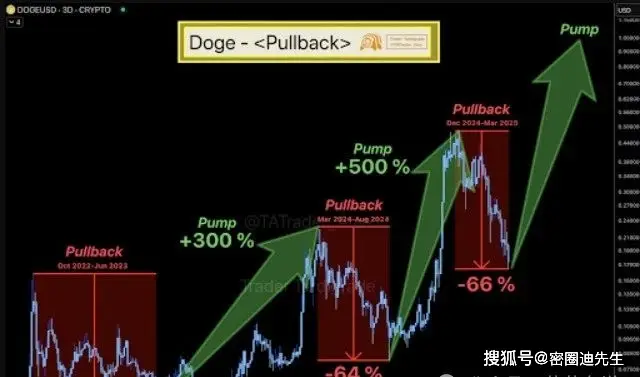
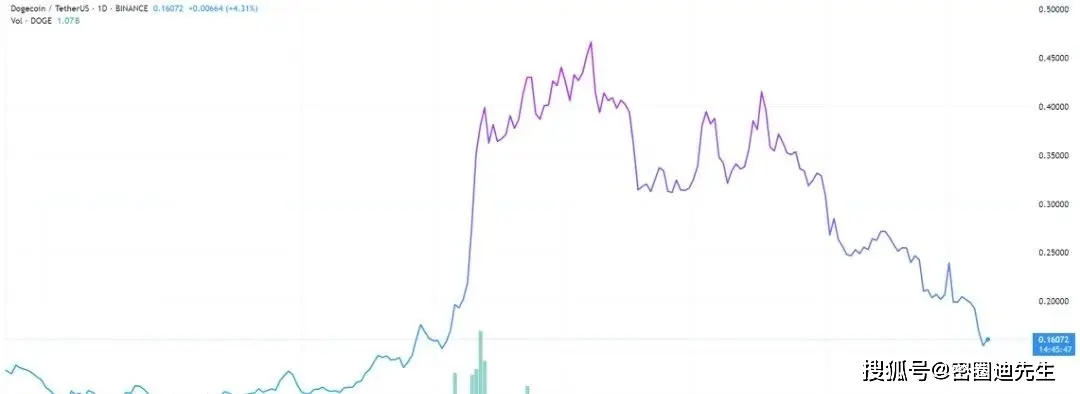
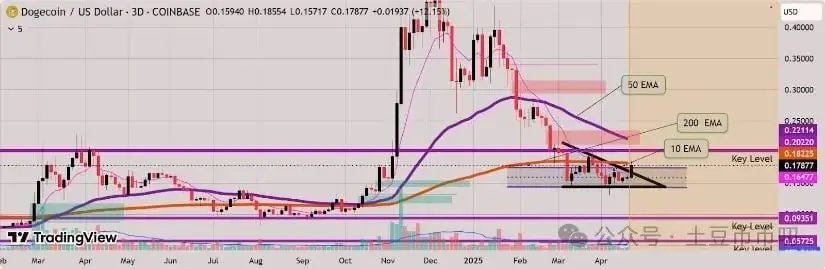
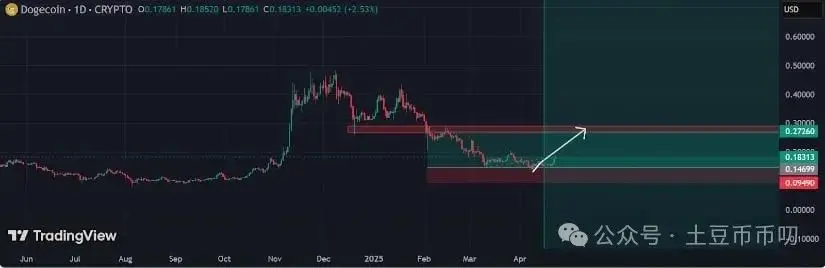
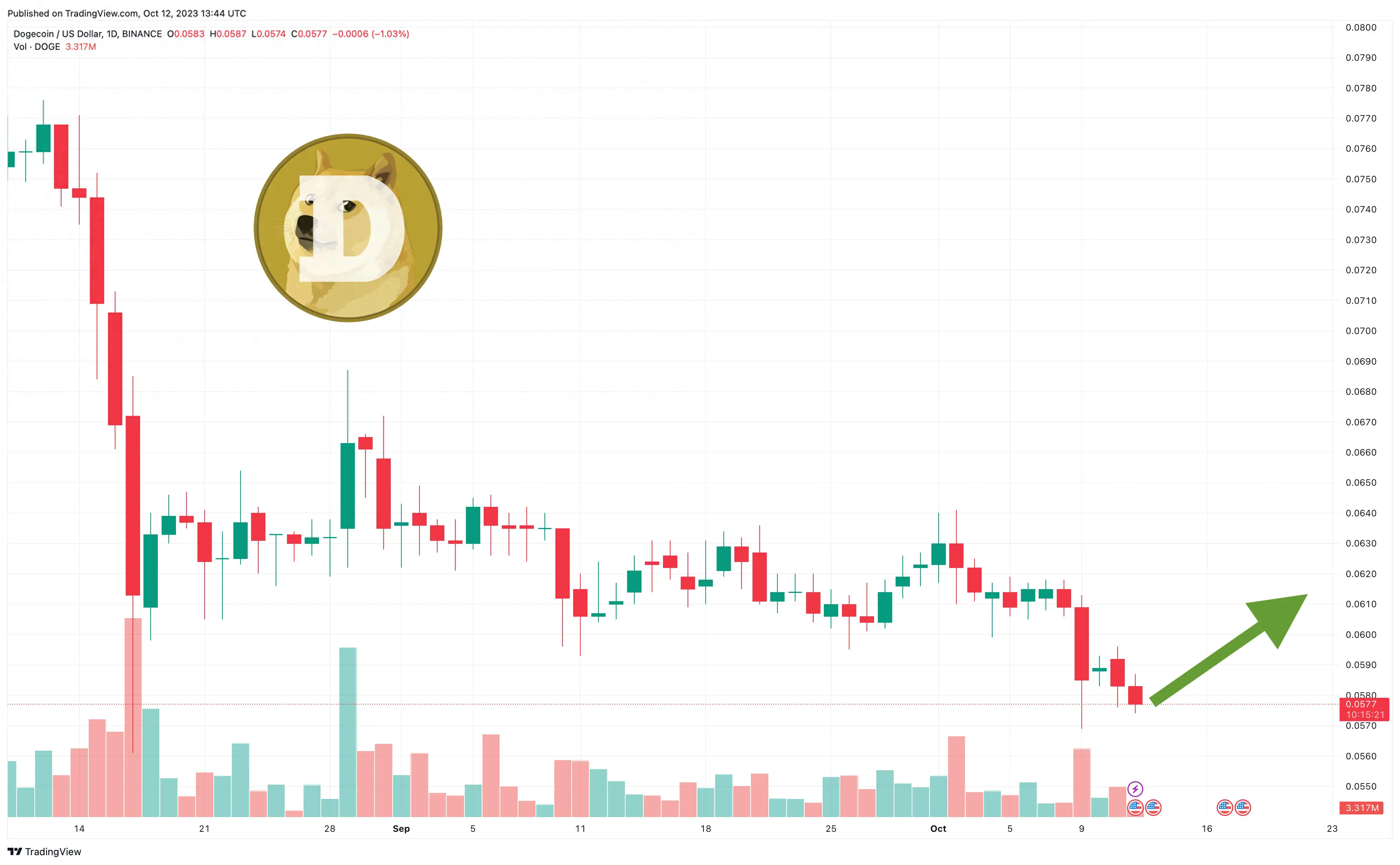
The risk of investing in Dogecoin is very high, because its price will change dramatically due to market sentiment. It may rise sharply or plummet in a short period of time, which is highly speculative. In particular, Musk's words and deeds have a great impact on the price of Dogecoin. At the beginning of last year, he tweeted in support of Dogecoin, causing its price to soar hundreds of times. Later, due to his remarks that Dogecoin was a scam, the price of Dogecoin plummeted.

Here, Vernacular Blockchain will also take you to review the violent fluctuations of Dogecoin.

The first major infusion of Dogecoin came into the crypto market around March 10, 2017, following a massive increase in retail investment, which boosted the prices of all altcoins. In a span of 70 days, the “funny” cryptocurrency rose from $0.00021 to a peak of $0.0042, a gain of more than 1,890%. This shattered the previous all-time high of $0.0021, sending the market cap soaring by $423 million. Shortly afterwards, Dogecoin plummeted 75% in a two-week market correction, which in turn affected all cryptocurrency prices.

By November 2017, there was another strong buying momentum in the cryptocurrency market, with huge trading volumes pushing Bitcoin to a high of $19,783. The global cryptocurrency market value has reached a staggering US$830 billion, which has also driven the parabolic growth of small-market value projects such as Dogecoin.

On January 7, 2018, Dogecoin broke through $0.02, 380% higher than its previous high. Its current market capitalization is US$1.6 billion. However, this rally was very short-lived, with the price falling by more than 70% in 8 days, back to $0.0047.

The Third: Crypto Market Rally

On April 14, 2018, just before the entire market entered the “crypto winter” and fell to previous lows, the vast majority of crypto projects experienced a brief recovery. In three days, Dogecoin rose from $0.0020 to $0.0041, an increase of 103%. In comparison, Bitcoin only gained 40% in the same month. But it didn’t take long for Dogecoin’s market value to drop by more than half from its all-time high.

In September 2018, the first major rally in Dogecoin that was largely unrelated to the rest of the crypto market, system testing of the Dogecoin/Ethereum bridge was completed.

This bridge is considered a new update that will allow interoperability between the two blockchains. The announcement reignited community support for the project, and the price of Dogecoin increased by 173% in 48 hours. However, it was later learned that due to the plummeting price of Ethereum, there was not enough funds to continue developing the bridge, so the update was put on hold. Since then, no one has mentioned whether the bridge between Dogecoin and Ethereum will continue. The price of Dogecoin has also recovered.

Fifth time: Tiktok becomes popular

In mid-2020, a viral video on Tiktok caused a chain reaction, triggering a sharp rise in the price of Dogecoin.

A TikTok netizen launched a challenge called #DogecoinTikTok#, encouraging netizens on the platform to buy Dogecoin and raise its price to $1 each. Some netizens calculated that if all 800 million TikTok users spend $25 to buy Dogecoin, then when Dogecoin rises to $1, each of them will earn $10,000.

There is no doubt that the hype from TikTok netizens has pushed up the price of Dogecoin. As the hype intensified, Dogecoin was trading at more than 2.5 times what it was a few weeks ago. Then it gradually fell back.

On January 11, 2021, the traditional financial market was severely disrupted by a subreddit forum called WallStreetBets (aka WSB). These amateur stock investors decided to band together against traditional financial institutions and launched stocks such as GameStop, BlackBerry, AMC, Nokia and Bed Bath & Beyond that major hedge funds were betting would lose value.

On January 28, WSB stock market mania spread to Dogecoin and drove a sharp rebound in the cryptocurrency. In less than two days, Dogecoin surged to an all-time high of $0.087 on Binance, a gain of 1,100%. The surge was driven in part by several tweets, including one from Musk.

But later Musk said in an interview that Dogecoin was a scam, and then the price plummeted…

Seventh time: Musk’s tweet

On April Fools' Day, April 1, 2021, Musk said that he would use SpaceX to bring a Dogecoin to the moon.

As soon as the news came out, Dogecoin went straight up

rose, rising 15% that day. Since then, Dogecoin has started a rapid rise mode: after breaking through 0.1 US dollars on April 14, it hit a record high price of 0.43 US dollars on April 19, and the currency price soared 336% in just one week. According to data from CoinMarketCap, its total market capitalization reached $50 billion on April 20, surpassing Ford Motor Co.

On May 5, the price of Dogecoin rose sharply again, exceeding US$0.68 during the session. The 24-hour increase once exceeded 50%, setting another record high. As of May, the market value was approximately US$88 billion, making it the fourth largest cryptocurrency at the time after BTC, ETH and BNB. Its price later dropped as the tweet’s popularity declined.

Dogecoin has enjoyed a parabolic surge over the last week, during which time Dogecoin has climbed from approximately $0.06 to nearly $0.15, a percentage gain that far outpaces Bitcoin’s performance.

The direct reason is that Musk, a long-term supporter of Dogecoin, spent $44 billion to acquire Twitter.

Looking back since its birth, the price of Dogecoin has soared from less than US$0.0001 in 2013 to US$0.74 in May 2021, a surge of hundreds of times, and then plummeted. The price of Dogecoin fluctuates greatly, so it is not suitable for investors looking for stable returns.

To sum up, it must be said that Musk is indeed a key figure to Dogecoin. It can be seen that although there has been an increase from 2017 to 2020, the overall fluctuations are not large. Since Musk's intervention in 2021, Dogecoin has started a roller coaster-like price trend. If dogs are man’s best friend, then for the famous Dogecoin, the best friend must be Musk.

03 Issues that cannot be ignored

In the huge market of more than 5,000 cryptocurrencies, Dogecoin is a special existence. We know that the birth of Dogecoin is completely a black humor. It just originated from Billy and Jackson's copycat of Bitcoin in 2013, and then it accidentally became popular. But I didn’t expect that because of the price, it would develop into the “behemoth” it is today.

If the price rise and fall is a major attraction and advantage of Dogecoin, then these existing problems may give you a more comprehensive and clear understanding of Dogecoin.

1. Development has stalled and the code has not been updated for a long time.

Few people know that before Musk made Dogecoin popular, Dogecoin’s blockchain development was more sporadic than other blockchain projects. In the past few years, its basic code maintenance has almost stagnated. The last major development of Dogecoin was back on November 8, 2019, and there were no updates to the project code between November 10, 2015, and February 4, 2018. As recently as last month, news broke that the Dogecoin development team is currently working on two major versions – core updates 1.14.7 and 1.21, but they should not be implemented yet.

2. Almost no ecosystem, limited application scenarios

In addition to being used as a reward medium on Reddit once before, Dogecoin as a payment method is not widely used at present. According to some reports, only 1,300 companies may accept Dogecoin as a payment method by 2021, and this unremarkable achievement took eight years. There are now approximately 40,000 transactions being transferred on the Dogecoin blockchain every day, which is less than a fraction of the number of daily transactions on Visa and Mastercard.

Source: https://explorer.viawallet.com

BTOK: A Safe And Reliable Chat Investment Platform For Blockchain Investors

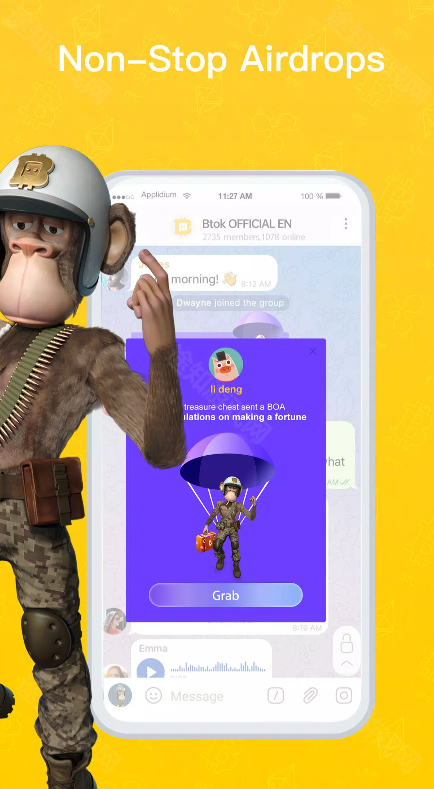
btok is mainly for blockchain investors and enthusiasts. It can provide very good instant messaging functions and create the most professional, safe and reliable chat investment platform for digital currency trading investors. If you like it, you can check it out.

btok区块链社交网络_BTOK_btok数字货币交易平台

Software introduction

btok is a very safe and reliable digital currency trading platform. The software interface is very refreshing and easy to use. You can see the latest news on the currency market that interests you immediately. In the enhanced version of btok, you can learn the latest currency transaction information here, and the safe transaction process makes every user feel at ease. If you think the enhanced version of btok is not bad, then come and download it and experience it.

btok features

The software homepage provides a convenient query function, allowing users to easily obtain relevant information about various digital currencies around the world, thereby quickly understanding the latest developments in the virtual currency market.

Users can also find the detailed information and names of various borrowing currencies in the software, which helps them more fully understand the investment potential of the virtual currency on hand and provide a reference for investment decisions.

The software also has a unique currency community function, allowing users to post or participate in discussions, share insights and opinions with other investors, and obtain exclusive information about virtual currency market trends.

Software advantages

1. Quotation inquiry and customized currency display;

2. Real-time trading, placing orders and canceling orders;

3. Quick recharge (APP exclusive) and fast cash withdrawal.

4. Register, log in currency, bind mobile phone and change password;

Software function

1. Supports various types of currencies, both domestic and foreign currencies can be traded.

2. The information circulation speed is very fast, and the entire payment service is very safe.

3. You can monitor the data fluctuations here anytime and anywhere, which can help you adjust your trading status in a timely manner.

Software Highlights

1. You can also freely trade various personal virtual items here to save your time.

2. You can select the information you need to query every day and save trend charts based on different data.

3. It not only provides a variety of digital currency trading pairs and market monitoring functions, allowing users to conduct digital currency buying and selling transactions and obtain corresponding benefits.

BTOK_btok数字货币交易平台_btok区块链社交网络

What is the difference between Btok and airplane?

Btok and Telegram are two different softwares. They differ in functions, services and target user groups:

1. Technical basis: Btok is based on blockchain technology, while Telegram uses end-to-end encryption technology.

2. Service content: Btok focuses on digital currency transactions and blockchain social networks, while Telegram mainly provides encrypted communication services.

3. Target users: Btok targets digital currency investors and blockchain enthusiasts, while Telegram targets a wide range of user groups who need secure communication.

4. Functional differences: Btok provides digital currency transactions and blockchain social network services, while Telegram provides a wider range of communication functions, including group chats, channels, etc.

How to join btok group

1. Open the BTOK app, click the search button on the home page, enter the group number and click search.

2. Find the group related to the group number in the search results.

3. Click the group name to enter the group details page.

4. In the group details page, you will see a "Join Group" button. Click this button to join the group.

btok software review

Btok software can quickly process and refresh the latest data information, helping users monitor market trends and data changes in real time. Users can also obtain in-depth analysis content from various experts and investment and financial management experts through the software, and obtain professional analysis as soon as possible. The software supports global fiat currency trading, currency trading and leverage trading operations, meeting the investment needs of different users. Users can use the community function of the software to view more transaction information, understand market conditions, communicate and share.

How to withdraw coins on btok

1. Use Btokapp to open coins, and then log in to your account.

2. Enter the electronic wallet page and enter the type of digital currency you want to withdraw.

3. Click the "Withdraw" button and enter the payment amount and payment address.

4. Make sure there are no problems, then click "Confirm Submit" to submit the application.

5. The application will be automatically processed for you, and the extracted digital resources will be transferred to the recipient address you specify through currency.

What's the matter with btok login not working?

1. Solutions to network connection problems:

1. Check the network connection:

Make sure the device is connected to a stable and reliable network environment.

Try switching to another network (such as Wi-Fi to mobile data, or mobile data to another Wi-Fi) to resolve the issue.

Check server status:

Sometimes Btok's server may be down or under maintenance, resulting in the inability to log in. You can check the server status announcement on social media or Btok official website.

2. Solutions to software problems:

1. Update software:

Make sure to install the latest version of Btok. Older versions may have known login issues or security vulnerabilities. You can download the latest version from the app store.

2. Reinstall the software:

If the issue is not resolved after updating, try uninstalling and reinstalling Btok. This clears potential cache or corrupt files.

3. Solutions to account problems:

OKX Wallet Official Download Channel And Security Settings Guide, Quick Look

Officially certified app store download

In order to ensure the safety of mobile users, OKX Wallet has opened official certification channels in mainstream application stores, including:

Official social media and community verification

OKX Wallet will regularly release genuine download address information on official social media platforms (such as Twitter, Telegram, Weibo, WeChat, etc.). Users can follow the following accounts to get the latest updates:

OKX钱包官方下载渠道_辨别OKX钱包真伪技巧_OKX download from official website

Note: "Download links" shared in social media private messages or comment areas need to be carefully screened, and the information actively released by the official account must prevail.

Official customer service and channel support

If you have any questions about the download address, you can verify it through OKX official customer service channels:

How to identify the authenticity of the official OKX wallet download address?

Even through the above channels, users still need to master basic identification skills to avoid being misled by “high imitation” websites:

Recommendations for security settings after downloading and installing OKX wallet

After successfully downloading the official version, in order to further ensure asset security, users are recommended to complete the following operations immediately:

Backup mnemonic phrase/private key: When creating a wallet for the first time, the system will generate a 12-digit mnemonic phrase, which needs to be copied in a safe location (such as offline paper, encrypted USB disk), and never taken screenshots or stored in networked devices; Set a strong password + two-factor verification: Enable high-strength passwords in the wallet settings, and bind 2FA tools such as mobile phone verification codes and Google Authenticator; Update the version regularly: Pay attention to official announcements, upgrade the wallet to the latest version in a timely manner, and fix potential security vulnerabilities; Test small-amount transfers: When using it for the first time, it is recommended to test small-amount asset transfers first and confirm that the wallet function is normal before proceeding with large-amount operations.

As an important bridge connecting users to the Web3 world, the security of OKX wallet has always been the core focus of the OKX team. Users only need to download it through authoritative channels such as the official website and official app stores, and master basic identification skills to effectively avoid risks. Finally, we remind you again: digital asset security is no small matter, and looking for official channels is the first line of defense to protect assets. If you encounter suspected fraud or security issues, you can always provide feedback through OKX official customer service to jointly maintain a healthy digital asset ecosystem.

OKX download from official website_辨别OKX钱包真伪技巧_OKX钱包官方下载渠道

OKX Safe Download Guide From The Official Website: Multi-Steps To Ensure File Integrity

The cornerstone of safe downloading is visiting the correct official website. Wrong websites or third-party links may carry malware or provide unofficial modified versions of files.

[Core Points] Be sure to check the URL carefully and be wary of misspellings or phishing websites that imitate official domain names (official-eu1.com is forged into officia1-eu1.com).

Step 2: Enter the download area or center page

After entering the official website, look for columns related to "Download", "Download", "Resource Center" or "Support". These pages usually display all products, tools or versions available for download.

安全下载官方网站_官方下载步骤_OKX download from official website

Click to enter this page and you will see a product list or category navigation.

Step Three: Choose and Match the Right Version

On the download page, you need to choose the most appropriate version according to your needs. This is a key step to ensure that the software can work properly.

Select system architecture: Select software version:

[Key Points] Read the release notes carefully and choose the option that exactly matches your device and needs.

OKX download from official website_官方下载步骤_安全下载官方网站

Step 4: Click Download and wait for completion

After selecting the version, you will see an eye-catching "Download" or "Download" button. Click it and the browser will start downloading the file.

Please wait patiently for the download progress bar to reach 100%.

Step 5: Verify file integrity (strongly recommended)

In order to ensure that downloaded files have not been damaged or tampered with during transmission, officials usually provide the hash value of the file for verification, which is the last line of defense to ensure security.

[Core Points] Although this step is tedious, it is strongly recommended for important software or system images, as it can effectively avoid various problems that may arise during subsequent installation or use.

Step 6: Installation and use

After the file verification passes, the installation process can begin.

Through the above six steps, you have successfully mastered the complete process of safely downloading "European" resources from official channels. The core of official downloading is "Confirm the official website -> Accurate selection -> Careful verification". Following these principles will not only ensure that you get the purest and most stable software experience, but also effectively avoid security risks from the network. I hope this tutorial can be helpful to you!

OKX Official Download Risk Prevention Guide To Ensure Asset Security And Trading Experience

Today, when digital assets are booming, choosing a safe, reliable, and powerful exchange is the top priority for every investor. OKX (formerly OKEx), as one of the world's leading cryptocurrency trading platforms, has won the trust of millions of users around the world with its rich product line, high liquidity, and professional services. As the platform becomes increasingly popular, the Internet is also flooded with various unofficial download links. If you are not careful, you may face the risk of phishing websites and malware.

OKX download from official website_OKX官方App地址_安全获取OKX交易所App

Obtaining and accessing the official address of the OKX Exchange App is the first and most important step to ensure the security of your assets and trading experience. This article will explain in detail how to safely find and use the official App address of OKX.

Why do I have to download it through official channels?

Before providing a specific address, we must emphasize the extreme importance of using official channels. Downloading apps through unofficial or third-party links may bring the following serious risks:

Asset security threats: Phishing websites will disguise themselves as OKX login pages. Once you enter your account number and password, your account and assets will be stolen instantly. Malware infection: Some unofficial installation packages may be implanted with Trojan viruses or malicious programs that not only steal your personal information but may also take control of your device. Missing or abnormal functions: Unofficial versions may not receive timely updates, resulting in the inability to use new features, or even transaction delays, data errors and other problems, seriously affecting your trading decisions.

In order to eliminate the above risks, please remember the official domain name of OKX and learn how to verify its authenticity.

Guide to obtaining the official address of OKX Exchange App

In order to serve users in different regions around the world, OKX provides official websites and app store download addresses in different regions. The following is the core method to obtain the official address:

OKX官方App地址_OKX download from official website_安全获取OKX交易所App

Visit the official website (the most recommended way)

This is the most authoritative and safest access point. You can access OKX’s global official website through your computer browser:

OKX Ouyi Official Download Tutorial Is Here! Both Mobile And Computer Versions Are Available

Today, as digital currency transactions become increasingly popular, it is crucial to choose a safe and reliable trading platform. As one of the world's leading digital asset trading platforms, OKX Ouyi has been favored by many investors for its rich trading varieties, professional security protection and smooth user experience. For new users, downloading and installing the OKX Ouyi App is the first step in starting a trading journey. This article will provide you with a detailed download tutorial for OKX Ouyi, covering mobile phones (iOS/Android) and computers, to help you quickly obtain the official application and ensure transaction security.

OKX欧意下载教程_OKX download from official website_OKX欧意官方下载渠道

Must read before downloading: Why choose official channels?

When downloading the OKX App, be sure to obtain it through official channels. This is the key to ensuring account security. Unofficial channels may carry risks such as malicious tampering and virus implantation, leading to personal information leakage or asset losses. OKX officials will regularly update the app to optimize functions and fix security vulnerabilities. Only the official version can ensure that you enjoy the most stable and secure service.

Mobile version download tutorial (iOS/Android)

Mobile phones are the preferred device for most users to trade OKX. The download process is as follows:

iOS users (iPhone/iPad)

Step 1: Open the App Store

Find the "App Store" icon on the device desktop and click to enter.

Step 2: Search for "OKX" or "OKX European Italy"

Enter "OKX" or "OKX Ouyi" in the App Store search box, and be sure to look for the official developer "OKX Blockchain Technology Inc.".

Step 3: Click "Get" and install

Find the official App in the search results, click "Get" or the cloud download icon, follow the prompts with Face ID or enter the Apple ID password to complete the download.

Step 4: Trust the app (if first time installation)

Some iOS devices may need to trust enterprise-level applications in "Settings-General-VPN and Device Management", but the version of OKX listed on the App Store does not require this operation and can be used directly by opening it.

Android users (Huawei/Xiaomi/OPPO/vivo, etc.)

Step 1: Visit OKX official website

Open the mobile browser and enter the official website of OKX Europe (please look for the official website domain name to avoid downloading through unofficial links).

Step 2: Enter the "Download" page

Find the "Download" or "App Download" entrance on the homepage of the official website, usually at the top or bottom of the page.

Step 3: Select Android version to download

Click the "Android Download" button, and the browser will automatically detect and start downloading the APK installation package.

Step 4: Install and authorize

After the download is complete, open the installation package. If the system prompts "Prohibit the installation of applications from unknown sources", you need to go to "Settings-Security-Unknown Source Applications" to turn on authorization (different brands of mobile phones have slightly different paths, for example, Huawei needs to turn it on in "Settings-Security and Privacy-More Security Settings").

Step 5: Log in to use

After the installation is complete, open the OKX App, register/log in with your mobile phone number or email to start using it.

Computer download tutorial (Windows/macOS)

If you are used to conducting trading analysis or operations on a computer, OKX also provides a professional computer client.

Windows users

Step 1: Visit OKX official website

Open your computer browser and enter the OKX official website.

Step 2: Find "Desktop Download"

On the "Download" page of the official website, select the "Windows" version and click "Download".

Step 3: Install and run

After the download is completed, double-click the installation package and click "Next" as prompted to complete the installation. After the installation is successful, double-click the desktop icon to open the OKX client, enter your account information and log in.

macOS users

Step 1: Visit OKX official website

Also enter the OKX Ouyi official website through the browser.

Step 2: Select the "macOS" version to download

Click the "macOS" button on the "Download" page to obtain the DMG installation package.

Step 3: Drag and drop installation

After the download is complete, open the DMG file and drag the OKX icon to the "Applications" folder.

Step 4: Open and trust the app

Find OKX in "Applications", right-click to open it (if the prompt cannot be opened, you need to allow "Apps from the following locations: App Store and Recognized Developers" in "System Preferences – Security & Privacy").

Must do after downloading: security verification and account settings

After completing the download of OKX Ouyi App, in order to ensure the security of your account, it is recommended to perform the following operations:

Bind two-factor authentication (2FA): Turn on Google Authenticator or SMS verification in the "Security Center" to prevent account theft. Set a complex password: Avoid using simple passwords and recommend a combination of letters, numbers, and symbols. Complete real-name authentication: Complete KYC authentication according to platform requirements to improve account transaction authority and security. FAQ

Q1: What should I do if it prompts "Cannot install" after downloading?

Q2: How to confirm that the downloaded version is the official version?

Q3: Are there any differences in functions between the computer version and the mobile version?

The core functions are the same, but the computer version is more suitable for in-depth transaction analysis (such as K-line charts, batch operations, etc.), while the mobile version is more convenient for checking market conditions and making quick transactions at any time.

Through the above tutorial, you can easily download and install the OKX official App. Whether it is a mobile phone or a computer, OKX can provide you with a safe and efficient trading experience. Always downloading the application from official channels is the first step to protect the security of digital assets. Download OKX now and start your digital asset investment journey!

OKX Official Download Tutorial! Full Coverage On Mobile Phones (iOS/Android) And Computers (Windows/Mac)

OKX (formerly OKEx), as a world-renowned digital asset trading platform, has attracted many investors with its rich currency, high liquidity and professional financial services. If you also want to experience the convenient trading of OKX, the first step is to download and install the official App. This article will introduce you to the download method of OKX in detail, covering mobile phones (iOS/Android) and computers (Windows/Mac), helping you quickly complete the registration and start your digital asset trading journey.

Must read before downloading: Safety first, look for official channels!

Before downloading OKX, please be sure to note: Only obtain the installation package through official channels, and avoid downloading from unknown links or third-party platforms to prevent malware or phishing scams. OKX official download channels include:

OKX欧意官方App下载_OKX欧意手机端下载教程_OKX download from official website

Mobile download tutorial (iOS/Android) (1) Apple iOS users: Install directly from the App Store. Open the App Store: Find the "App Store" icon on your iPhone or iPad and click to enter. Search for "OKX": Enter "OKX Europe" or "OKX" in the search box at the top, select the officially certified App (the developer is "OKX Holding Limited", look for the official OKX logo). Click to download: Click "Get" or "Download", enter your Apple ID password or verify via Face ID/Touch ID, and wait for the installation to complete. Open and verify: After installation, click "Open". For first-time use, you need to complete account registration or login according to the prompts (supports email, mobile phone number, Google, etc.).

Note: If you cannot search for OKX in the App Store, it may be due to network restrictions in your region. It is recommended to switch the Apple ID region or download the iOS installation package through the official website (you need to trust the enterprise certificate in "Settings-General-VPN and Device Management").

(2) Android Android users: safe installation through official channels

The Android system is highly open, and it is recommended to download it through the following two safe methods:

Way 1: Google Play Store (recommended)

OKX欧意手机端下载教程_OKX download from official website_OKX欧意官方App下载

Open the "Google Play Store" on your phone and search for "OKX". Select the official App (the developer is "OKX Holding Limited") and click "Install". Wait for the download to complete and open the App to register and use it.

Method 2: Download the APK installation package from the official website (applicable to areas where Google Play cannot be accessed)

OKX Mobile Computer Installation Guide: Download From The Official Website, With Safety Precautions

Preface

As a world-renowned digital asset trading platform, OKX has attracted many investors with its rich currency, high liquidity and convenient operating experience. If you also want to join OKX for trading, you first need to complete the installation and registration. This article will introduce the installation steps of OKX in detail (taking the mobile phone and computer as examples), and attach precautions to help you get started quickly.

Preparation before installation: Confirm the equipment and network environment

Before installing Euro-Italian Exchange, please make sure:

Device compatibility: Network environment: Make sure the network is stable. It is recommended to use Wi-Fi or 4G/5G network to avoid installation failure due to network lag. Storage space: At least 100MB of free space must be reserved on your mobile phone/computer to ensure the normal operation of the application. Mobile phone installation steps (take Android/iPhone as an example) Android phone installation iPhone installation Computer side installation steps (Windows/macOS) Windows computer installation macOS installation Precautions after installation Security verification: When logging in for the first time, it is recommended to turn on "Google Authenticator" or "SMS Verification" to improve account security. Download through official channels: Be sure to download through the Ouyi official website or official partner app stores (such as App Store, Huawei App Store, etc.) to avoid malware risks from third-party channels. Version update: Ouyi will regularly update the version to optimize functions. It is recommended to upgrade in time in "Settings – Check for Updates" to ensure a smooth experience. Risk warning: There are risks in digital asset trading. Please invest rationally and do not believe false propaganda such as "high returns and guaranteed capital". FAQ

Through the above steps, you have successfully completed the installation of Euro-Italian Exchange. As a novice, it is recommended to familiarize yourself with the trading interface and operation logic, and start to accumulate experience with small-amount transactions. Be sure to pay attention to account security, regularly change passwords, and enable double verification to ensure that your assets are worry-free.

If you still have questions, you can contact Ouyi official customer service ("Help Center" on the official website or "Online Customer Service" in the APP) to obtain professional support.

Go to Euro-Italian Exchange now and start your digital asset trading journey!

OKX Official APP Download Guide: Download From The Official Website To Ensure The Security Of Digital Asset Transactions

In the field of digital asset trading, choosing a safe and reliable platform is the first prerequisite for users. OKX (OUYi), as the world's leading digital asset trading platform, has attracted tens of millions of users around the world with its rich product matrix, stable trading experience and strict security guarantees. For novice users, download through the OKX official website Downloading the official APP is the first and most critical step to start your trading journey – only by obtaining it from official channels can you ensure the security of your account, complete functions, and avoid the risk of third-party platform implantation. This article will introduce in detail the correct method, precautions and advantages of downloading the OKX official website to help you easily and safely access the OKX ecosystem.

Why do I have to download it through the OKX official website?

In an Internet environment with overflowing third-party app stores or links, "copycat APPs" and "phishing links" are the biggest security risks for digital asset users. Installation packages from unofficial channels may be maliciously tampered with, leading to serious consequences such as account information leakage and asset theft. Downloading through the OKX official website can fundamentally eliminate such risks:

OKX official website download detailed steps (graphic guide)

The OKX official website supports multi-language access and provides exclusive download solutions for different devices (mobile phones/computers). The following is the specific operation process:

Download the mobile version (iOS/Android) Download the computer version (Windows/Mac)

If users prefer computer operations (such as large-screen market viewing, high-frequency trading), the official website also provides PC clients:

Security settings you must make after downloading

After successfully installing OKX APP, in order to further protect the security of your account, it is recommended to complete the following operations immediately:

Turn on two-step verification (2FA): Bind Google Authenticator or SMS verification in "Security Settings" to ensure that account login and fund operations require secondary verification; Set fund passwords: Set fund passwords independently for sensitive operations such as withdrawals and transfers, separate from login passwords; Check device management: View the current login device in "Account – Device Management" and remove untrusted devices to avoid abnormal logins from remote locations. OKX core functions: safety and convenience that you can experience after downloading

After downloading OKX through the official website, users can enjoy the platform’s full ecological services in one stop:

Note: Three key points to avoid download traps: Look for the official domain name: The only domain name of the OKX official website is www.okx.com. Do not trust counterfeit domain names such as "okx.com.cn" or "okx.net". You can verify it through the official website customer service; Reject unofficial links: Do not install through "download links" in text messages or social media group chats, as these links are mostly phishing websites; Regularly updated version: The official website will release version updates from time to time (optimizing performance, fixing bugs). It is recommended to turn on automatic updates in "Settings – About OKX", or check the official website regularly to obtain the latest installation package.

In digital asset trading, "security" is the bottom line and "convenience" is experience. Downloading the official APP through the OKX official website is your first line of defense for safe transactions and the starting point for enjoying the full platform services. Open the OKX official website (www.okx.com) immediately, follow the above steps to complete the download, and start your safe and efficient digital asset trading journey! If you encounter any problems, you can get support through the official online customer service or help center. The OKX team is always by your side.

Ouyi APP Official Download Tutorial, With Detailed Steps And Safety Precautions For Mobile Phone/computer Version

As a world-renowned digital asset trading platform, OKX has attracted many users with its rich currency, deep liquidity and professional financial services. If you want to experience OKX’s convenient transactions, you first need to download the official APP. This article will introduce in detail how to download the OKX official website APP, and attach safety precautions to help you complete the download quickly and safely.

Why do you have to download the Ouyi APP from the official website?

When downloading any financial APP, security is the first priority. Unofficial channels (such as third-party app stores, unknown links) may have risks such as tampered versions, bundled malware, and information leakage. Downloading from the official website is the only way to ensure that you can obtain genuine and safe applications.

The Ouyi official website will regularly update the APP version to fix bugs and optimize functions. Downloading from the official website allows you to enjoy the latest services as soon as possible.

Detailed steps for downloading Ouyi official website APP (including mobile phone/computer version)

Whether you use an Android phone, iPhone or computer, you can complete the download through the following steps:

(1) Mobile download (common to Android/iOS)

Open your browser and search for "OUYI official website"

Enter the exact URL: www.okx.com in the mobile phone's built-in browser (such as Chrome, Safari) (pay attention to the official website logo to avoid entering counterfeit websites).

Enter the official website and find the download entrance

After entering the official website, there will be an obvious "Download APP" button at the top or bottom of the page (usually blue/orange with the words "Download Now"), click to enter the download page.

Select the corresponding system version

Install and open the APP

(2) Computer download (suitable for large screen operation)

If you are accustomed to using a computer for trading, you can also download the computer client (Windows/Mac system) through the official website:

Also open the Ouyi official website (www.okx.com) in the browser and click the "Download APP" button. Select "PC Client" on the download page and click download according to the system type (Windows/Mac). After the download is completed, double-click the installation file, follow the prompts to complete the installation, open the client and log in to use it. Newbie FAQs

Can't install after downloading?

The official website cannot be opened/downloading is slow?

It may be a network problem. It is recommended to switch the network (such as Wi-Fi/4G) or use the browser "incognito mode" to open it. If the abnormality persists, you can check whether the VPN proxy is set up on the phone, or contact Oyi customer service for feedback.

How to verify whether the downloaded APP is genuine?

Sign In

Forgot Password

Sign Up