In 2025, the field of AI crawlers will usher in new changes. This article focuses on the best practices of AI crawlers in 2025, and provides an in-depth practical demonstration of how to use the three major tool combinations of Deepseek, Crawl4ai, and Playwright MCP to achieve efficient and intelligent crawler operations. From environment construction to code practice, to dynamic loading and data extraction, it fully demonstrates the charm and potential of AI crawlers, allowing you to easily master cutting-edge crawler technology.
Let’s do a practical exercise today: use Crawl4ai to make an AI crawler and see what it looks like.
Test your skills
First install it according to the official code:
#Install the package
pip install -U crawl4ai
# Run post-installation setup
crawl4ai-setup
#Verify your installation
crawl4ai-doctor
Finally, when you see the picture below, it proves that the installation and initialization were successful.
Next, let’s test the official example.
import asyncio
from crawl4ai import *
async def main:
async with AsyncWebCrawler as crawler:
result = await crawler.arun(
url=”https://www.nbcnews.com/business”,
print(result.markdown)
if __name__ == “__main__”:
asyncio.run(main)
The official test is a news website
Create a new py file, paste the code into it, and run it directly. The results show that it can indeed be crawled normally.
Extract form
The latest version of Crawl4ai has a new function: after crawling the tables on the website, parse them into pandas DataFrame format.
To put it simply, before we needed to manually clean and structure the downloaded data, then convert it into DataFrame format for analysis.
Now you can do it in one step.
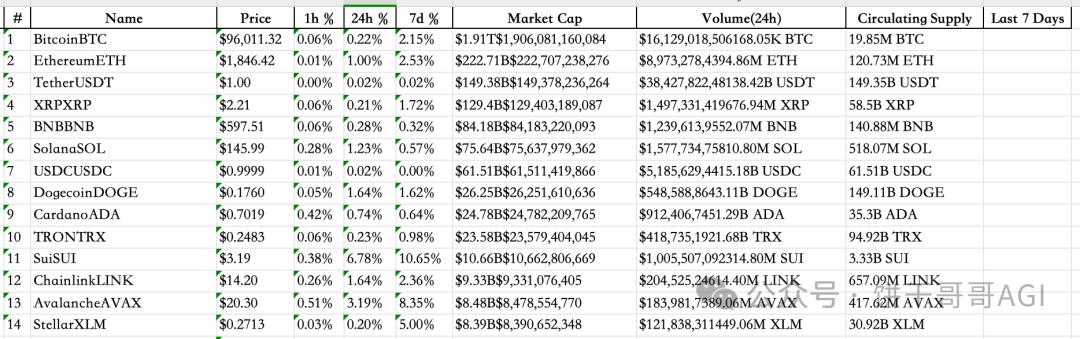
Let's take a look at this official example for a virtual currency website. We need to crawl down the table in the picture below and convert it into a python table, which can be directly used for the next step of analysis.
But there is a problem here: the official example cannot be used, as shown in the picture, it is incomplete, all are red wavy lines, and an error will be reported when running directly. My coding ability is poor and I can’t change it. What should I do?
It's very simple, just let AI change it. Go directly to Cursor.
But then there is a new problem: because this is a new function of crawl4ai, some AI should not have learned.
At this time, you can use the context7MCP we introduced before to let the AI learn the latest documents by itself and then complete the code. Red and warm! Cursor writes random code again? Install Context7 MCP in 1 minute to enjoy real-time document retrieval service
Prompt words I use:
The file code is the official example of crawl4ai. The effect is to capture the website table data as shown in the picture and save it in pandas dataframe format. However, this code is incomplete. You need to use context7 mcp to find the latest crawl4ai document and complete the code to ensure that it can be used normally.
After the AI operates for a while, the code it gets can be run directly. We see that the form from the previous website has been successfully downloaded into DF.
It went quite smoothly. I opened Excel to see it more completely, and then I could use the data for analysis.
dynamic loading
Today's websites are rarely static. Most of them are dynamically loaded, which means they need to be scrolled continuously to load new content. It would be too troublesome to handle this process by yourself.
Fortunately, Crawl4ai has built-in javascript support. We can directly write a js code to load all the content in one scroll of the page. result = await crawler.arun( url="https://dynamic content site.com", js_code="window.scrollTo(0,
document.body.scrollHeight);", wait_for="document.querySelector('.loaded')")
OK, so far, we have run through the official crawler sample code provided by Crawl4ai. But AI has not been used yet.
You know, the reason why we use these frameworks is to let AI help us solve the problems in crawling.
So let’s take a look at how to use AI to make crawlers in Crawl4ai? Advanced: Dynamically load large models to crawl e-commerce reviews
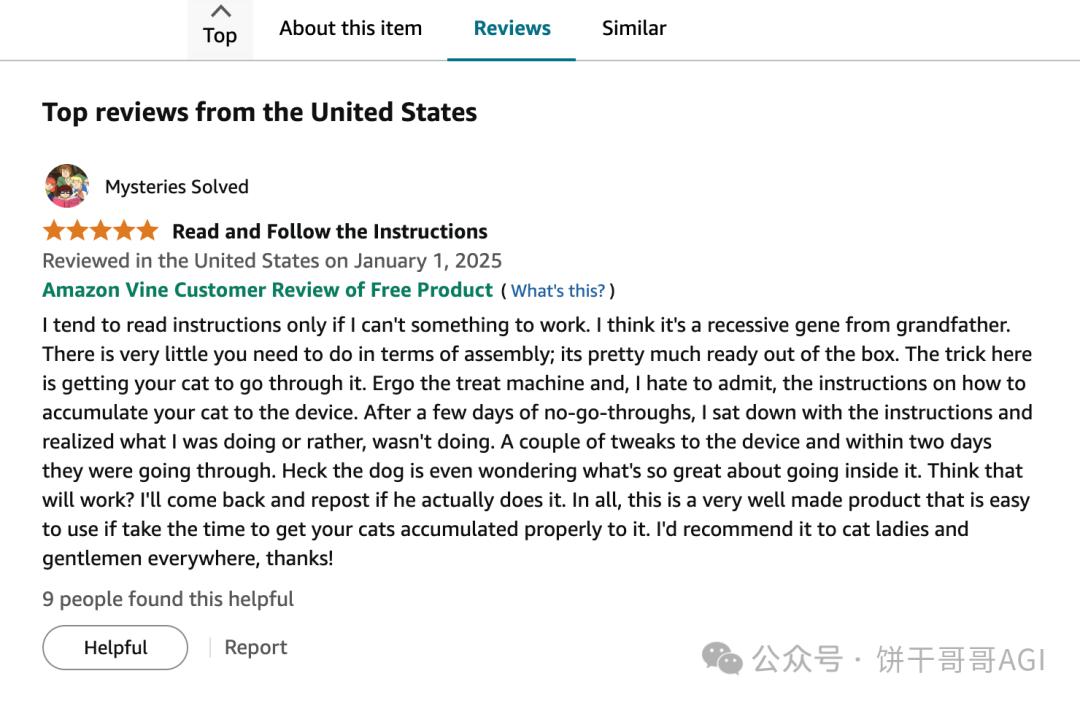
The business scenario comes first. I chose a high-frequency scenario: crawling e-commerce product reviews. (The comment data that is subsequently crawled can also be subjected to text analysis to unearth information of commercial value)
The URL is:
Scroll down to see the list of comments:
Utilizing playwright MCP initialization script
In the original Cursor window, let AI help us write the code first: Now you need to write a Crawl4ai script to grab the comments under this Amazon product: customer name, title, country, time, comment content, etc. You can use playwright mcp to check the website first, and then modify it.
I didn’t find it. I didn’t let AI write the code directly. Instead, I asked it to take a look at what the website looked like and then write the code.
Because the loading process, speed, and structure of each website are different, if you rush to write a general code, it may not work.
As for the introduction and installation of Playwright MCP, I have said it before. You can jump directly to this article to learn: Use Playwright MCP to let AI change the shit mountain code it wrote.
Having said that, we can already see the AI Called MCP tool automatically opening the Amazon website and `get_visible_html`, that is, taking a look.
The obtained code is as follows. It is very long overall. I have cut out some key parts, including suggestions, and put them in comments:
1. Define the data model for Amazon reviews
classAmazonReview(BaseModel):
customer_name:
review_title:
country_and_date:
review_body:
image_urls:
rating:
# 2. Use LLMConfig to configure the AI model
llm_config = LLMConfig(
provider=provider,
api_token=api_token,
base_url=base_url
# 3. Set the strategy for AI crawling data. The key is the prompt word.
strategy = LLMExtractionStrategy(
llm_config=llm_config,
schema=AmazonReview.model_json_schema,
extraction_type=”schema”,
instruction=f”””
Extract Amazon product review information from the provided HTML content.
Reviews are usually contained in a hook with the 'data-hook="review"' attribute
element.
Please extract the following information for each comment and construct it into a list of JSON objects:
1. `customer_name`: The name of the reviewer, usually within or near a span element with 'data-hook="genome-widget"'.
2. `review_title`: The title of the review, usually within a span or a element with 'data-hook="review-title"', which may be bold text.
3. `country_and_date`: The country and date of the review, usually within a span element with 'data-hook="review-date"', in a format similar to "Reviewed in on".
4. `review_body`: The body content of the review, usually within a span element with 'data-hook="review-body"'.
5. `image_urls`: List of image URLs uploaded by users in comments. Pictures are usually
tag, its parent element may have a 'review-image-tile' or similar class. Please extract
The 'src' attribute of the tag. If there are no images, this field is null or an empty list.
6. `rating`: The star rating of the review, usually near the review title or at the beginning of the review body.
Make sure to extract as many reviews as possible. Ignore content in non-comment areas on the page.
""",
chunk_token_threshold=8000, # Change back to a reasonable chunking threshold
apply_chunking=True, #Chunk large pages
input_format="html",
verbose=True# Enable detailed logs of LLM policy
# 4. Browser settings must be set, especially for websites with strong anti-crawling capabilities.
browser_config = BrowserConfig(
headless=False, # can be set to True to run in the background
java_script_enabled=True, # Ensure JavaScript loads comments
# You can add proxy, user-agent and other configurations to simulate real users and reduce the risk of being blocked.
# user_agent=”Mozilla/5.0 (Windows NT 10.0; Win64; x64) AppleWebKit/537.36 (KHTML, like Gecko) Chrome/91.0.4472.124 Safari/537.36″
viewport={“width”: 1280, “height”: 800},
verbose=True# Enable detailed logs of browser configuration
# 5. Crawler configuration
crawler_config = CrawlerRunConfig(
cache_mode=CacheMode.BYPASS,
page_timeout=90000, # Increase the page loading timeout, Amazon pages may be slow
extraction_strategy=strategy,
# Increase the waiting time to ensure that dynamically loaded comment content appears
# Note: crawl4ai currently does not have a direct wait_for_selector or a fine-grained waiting mechanism similar to playwright
# You can control the waiting time indirectly through page_timeout, or consider using playwright to operate directly later.
verbose=True# Enable detailed logs of crawler operations
# 6. Start crawling
result = await crawler.arun(
url=self.url,
config=self.crawler_config,
js_code="window.scrollTo(0, document.body.scrollHeight);",
wait_for="document.querySelector('.loaded')"
Complete crawling
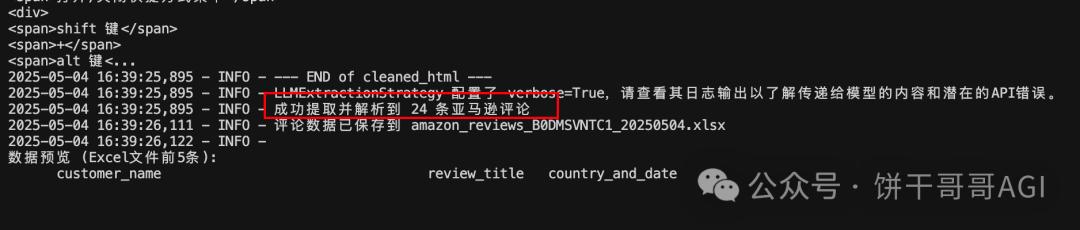
Look at the result, it’s pretty good
In particular, image_url can directly organize image addresses.
The logic of Crawl4ai is that it will first throw all the HTML to AI and then let AI come up with a parsing strategy, and then split it into multiple modules and give them to AI to parse the data one by one.
Here’s a key point: When choosing a model, pay attention to one that supports “big context”
The deepseek v3 I chose at the beginning was too small, so I couldn’t read the entire HTML at first and reported an error.
Later, I switched to gemini-2.5-pro-exp-03-25 and succeeded.
It’s a waste of tokens. You can feel it. I grabbed 24 comments and how much was consumed:
Total consumption: 992,830 (Prompt) + 6,348 (Completion) = 999,178 tokens
if
Calculating the cost of gemini-2.5-pro-preview-03-25, it is about 1.3 US dollars (Gemini helped me calculate it. Fortunately, I am using the free version.)
Summarize
To be honest, RPA is much more effective when it comes to crawlers, but RPA seems to be a false proposition. You need to set up processes, capture elements, design capture logic, etc. A codeless tool will make novices confused and have to learn from scratch.
The more feasible solution for AI crawlers now is based on Cursor and paired with Playwright MCP to develop Crawl4ai scripts.
Although it is not very easy to use now, it may be a very smooth AI crawler experience in the near future.